Download and unzip
Inside is one folder called Claude. That folder is your Brain.
Every token, component and content block on one page, each shown on its own so you can sign off the layout AND each piece separately. Real brand Typekit (Contralto Big + Acumin), the exact marine/clay palette, square edges, one locked ochre accent, tabular-numeral readouts, restrained motion. Refine a block here and every v1.2 page inherits it. Never linked publicly.
Marine + clay + stone, plus the ONE locked accent (ochre). The ochre is the same colour baked into every generated image, so page and imagery read as one system. On light grounds, accent TEXT uses the darkened --accent-ink for WCAG AA. Body/secondary text on clay uses --stone-body #586268 (5.59:1); --stone-60 is reserved for white surfaces only (fails AA on clay).
Display = contralto-big (all-caps, tracked, used sparingly per brand rule): reserved for the landing H1, the CTA-band H2, and the .display flourish. Section H2s set in acumin-variable sentence-case (same as H3), so the page reads modern rather than all-caps top to bottom. Body = acumin-variable. Stat readouts use the mono stack with tabular-nums for the technical-AI signal.
One intent, one download action. The primary conversion buttons lead with the FREE lever verbatim: "Get the free pack" (hero form submit + CTA band), so the strongest conversion token rides the button itself; the compact top nav keeps the shorter "Get the pack" lockup. Ochre underline on light; on ink bands the fill flips to ochre-on-ink for pop and AA. Square, tactile press.
Rationed: hero eyebrow + at most one label per three sections (Taste eyebrow-restraint). The live landing carries a label on only two of its six sections. Label text uses --accent-ink for AA on clay. No middot separators (Taste 9 divider-spam) - the FREE lever rides an ochre-fill flag, not a dot.
Left = offer (eyebrow, H1 ≤ 2 lines, lead ≤ 20 words, trust chips). Right = the LIVE capture form, above the fold on desktop AND mobile (form-first stack on mobile). A slim motif strip caps the form card so the page carries a real brand image without decoration owning the fold. This is the single conversion surface, reachable with zero scroll.
A free folder of plain-text files that turns Claude into an assistant which remembers how you work.
A single quiet anchor line that jumps a now-convinced reader back to the hero form, placed after the folder-proof beat so a mid-scroll reader can convert without hunting for the bottom band. Same verbatim label, one intent. Not a second theme, just a rule + line + button.
Convinced? The pack is free.
Get the packOne label, one display headline, one support line. Vertical stack (no split-header floater).
Every session starts from nothing. The Brain is the memory that closes the gap.
Two-card contrast. The "with a Brain" card carries the ink border + ochre top rule + ochre final mark, so the eye lands on the solution.
Every new chat is a blank slate. The work never quite sounds like you, because it never remembers you.
A folder of plain-text files Claude opens before it does anything. The work comes back sounding like you.
The real explanatory diagram beside a numbered, hairline-separated list. Image and list swap to stacked on mobile.
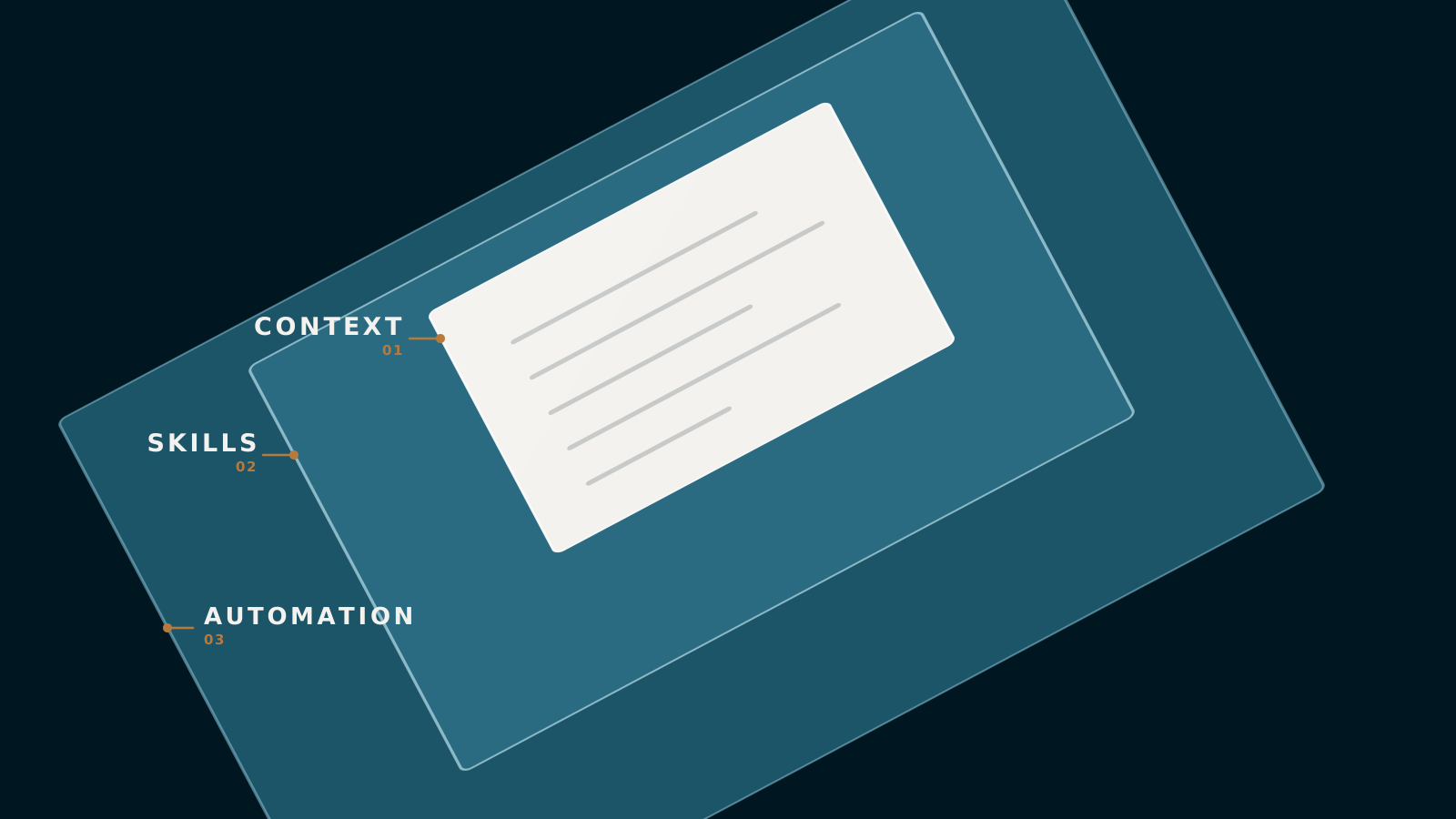
Who you are, what you sell, how you write.
Repeatable jobs it runs on command.
Jobs that run once they have earned your trust.
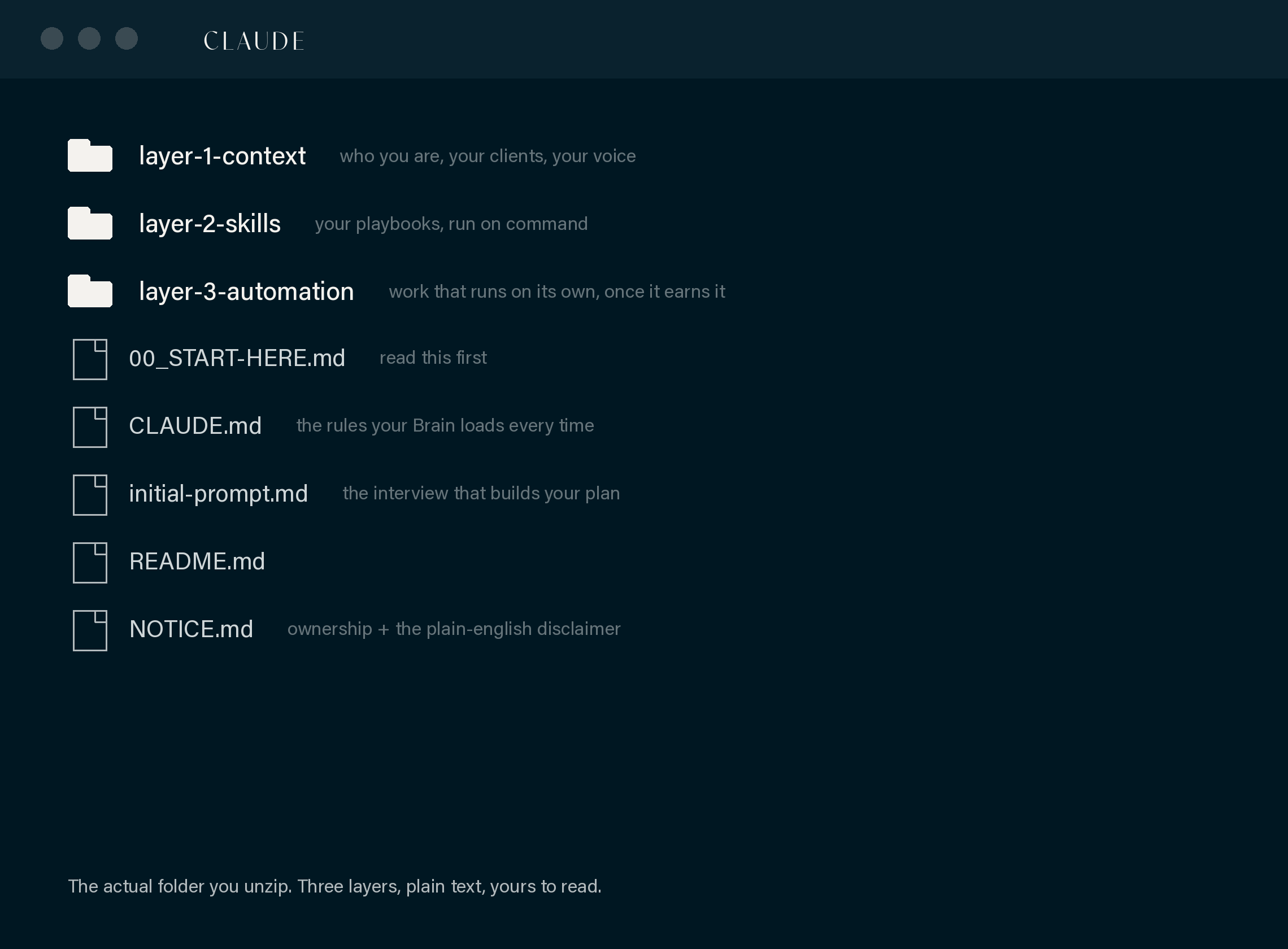
The honest "this is the actual thing" screenshot: the real unzipped folder, framed like a window, one functional caption below (no overlay pills). Folder structure only, no data.
When you unzip the pack you get one folder called Claude, with the three layers laid out as folders you can open and read.
Ochre top rule, mono numeral, short body. Three across, stacks on mobile. Sits under the full-width how-it-works motif band.
Inside is one folder called Claude. That folder is your Brain.
Point Claude Code at the folder, in VS Code or a terminal.
/brain-onboardYour Brain takes over. You talk, it types.
Product-first proof: Keith as the credible builder. The photo slot is a DESIGNED placeholder (3:4 portrait) - a soft marine duotone with a head-and-shoulders vignette and an ochre baseline rule, so it reads as "a photo lands here" rather than an empty box, marked clearly until a real headshot is supplied. Swap the .builder-photo figure for an <img>.
“Most of my team isn't human anymore, and the work is better for it.”
I run a full-service agency in Adelaide. I built this Brain over nine weeks because Claude kept forgetting my business every time I opened it.
Keith Cluse Cluse & Co, Adelaide
Ochre square marker per row, hairline dividers (one, not top-and-bottom on every row). The you'll-need panel carries the Pro-required line.
/brain-onboard and your Brain interviews you.The single conversion surface. It carries its OWN headline (.gate-head - "Get the free pack" + what the button does) so it never reads as a generic newsletter box. Name + email + company honeypot. Labels ABOVE inputs, ochre focus ring, ochre top rule. The fine-print leads with the FREE lever. Error text is a live region (role="alert"). On /api/capture success the JS swaps to the success state and, per the client contract, reads j.guide_url to reveal the DOMINANT full-width "Read the guide" button (the fastest download path, fires guide_view); the inbox line demotes beneath it.
Ochre left rule, mono step number, a "you'll know it worked when" check under a hairline. Number moves inline on mobile.
Body copy for the step, with a link out to an official source. You need Claude Pro (or higher).
You'll know it worked when the terminal shows Claude's welcome message.
Drives the guide's Mac/Windows and VS Code/Terminal content. Active tab is ink with an ochre underline. Persists per page in sessionStorage.
Shown on Mac.
Shown on Windows.
Shown on the VS Code path.
Shown on the Terminal-only path.
Mono command on ink, ochre Copy affordance. Writes to clipboard and flashes "Copied".
/brain-onboardOchre left rule for info; alert-red for the recovery/troubleshooting note.
Info. Something useful to know before the next step.
If something doesn't match: the recovery path goes here.
Native <details>, ochre +/minus marker (minus sign U+2212, never an en-dash). No JS needed.
The deliberate locked ink family (not a random theme flip). Ochre top rule, ochre CTA. Repeats the single download intent.
Placeholder for the walkthrough video on the guide. Ink ground, ochre top rule + label.