
Design system

Component library.

Every block on the landing and guide, shown on its own so you can react to each one. Marine + clay, Contralto display, Acumin body, one locked ochre accent.

Colour

Brand marine + stone + clay, plus the one locked accent (ochre). Round 4: ochre now carries one confident moment - the primary CTA fill (ink text, 5.1:1 AA) - and stays rationed everywhere else (rules, single nodes, focus rings). Body text on clay routes through Stone read (5.16:1 AA); Stone 60 is kept for borders + on-white contexts.

Marine / ink#001722
Marine raised#0A2F3F
Stone 60 (borders)#66747A
Stone read (body text)#5A686E
Stone 30#B2B9BC
Clay / off-white#F4F2EE
Surface#FFFFFF
Accent ochre (CTA fill)#B67A3D
Accent hover#C4884A
Accent deep (links)#8A5A24
Alert (errors)#8A2F1A

Type

Contralto Big for H1/H2 only (all-caps, tracked, used sparingly per brand). Acumin for everything else. Mono for code and file readouts.

H1 display

AI that remembers

H2 display

Three layers, all plain text

H3 body

The base Brain, ready to fill

Lead

A folder of plain-text files that turns Claude into an assistant that knows your business.

Body

Nothing hidden, nothing technical. You can open any file and read it.

Mono

/brain-onboard

Buttons

One primary intent site-wide: "Send me the pack". The primary is an OCHRE FILL with ink text (the one confident colour moment, 5.1:1 AA) so the download action is the loudest object on the clay page. On marine bands it inverts to a clay fill. Ghost = the quiet secondary (ink + border, ochre accent only).

Eyebrow

Small uppercase label with a single ochre tick. Used at most once per three sections (Taste restraint), never numbered.

Free, for Claude Code

Hero (form-led asymmetric split)

Left: offer, one-line lead, a purpose-cropped motif strip (pinned to the sheet-edge + ochre focal, not a flat slice), the Pro-required line. Right: the capture form as the centre of gravity, with a tiny ticked guide/download/walkthrough checklist so the offer is concrete at the point of action. Desktop: copy left, form right. Mobile (round 4): the value block (eyebrow + H1 + one short line) is thumbed FIRST, then the form, then the fuller copy - a cold visitor sees WHAT this is before the bare input. The form-card heading is demoted to a small label so only the H1 carries headline weight at the fold. This is the single biggest download-conversion lever.

Free, for Claude Code

AI that remembers how you work.

A folder of plain-text files that turns Claude into an assistant that knows your business.

Claude Pro (or higher) required. The pack itself is free.

One email, everything in it.

No drip sequence. It all arrives in one go:

  • The setup guide
  • The download
  • The walkthrough video

Your email is used to send you this pack, that is it.

Self-select ("this is for you if")

Two-column grouped list, ochre tick markers, first-person softened.

  • You are still the one doing the admin no one sees.
  • You have tried AI, and starting from scratch got old fast.
  • You want the work to sound like you.
  • You run a lean team and cannot hire the roles you need.

Value list (what's inside)

A SET, not a sequence, so no 01-04 index numbers. Each row is carried by a top hairline (the first is the full ochre accent rule) plus the h3. Effort-framed, no dollar figures.

  • The base Brain, ready to fill

    A zip of markdown and command files. The scaffolding is the work you get to skip.

  • A first session that does the work

    Type /brain-onboard and your Brain interviews you.
"You'll need" panel

Inset surface panel with the ochre left rule. Carries the Pro-required line.

You'll need

  • A Mac or Windows computer.
  • A paid Claude subscription. Claude Pro (or higher) is required.
  • 20 to 40 minutes for your first session.

Layers (real diagram + legend)

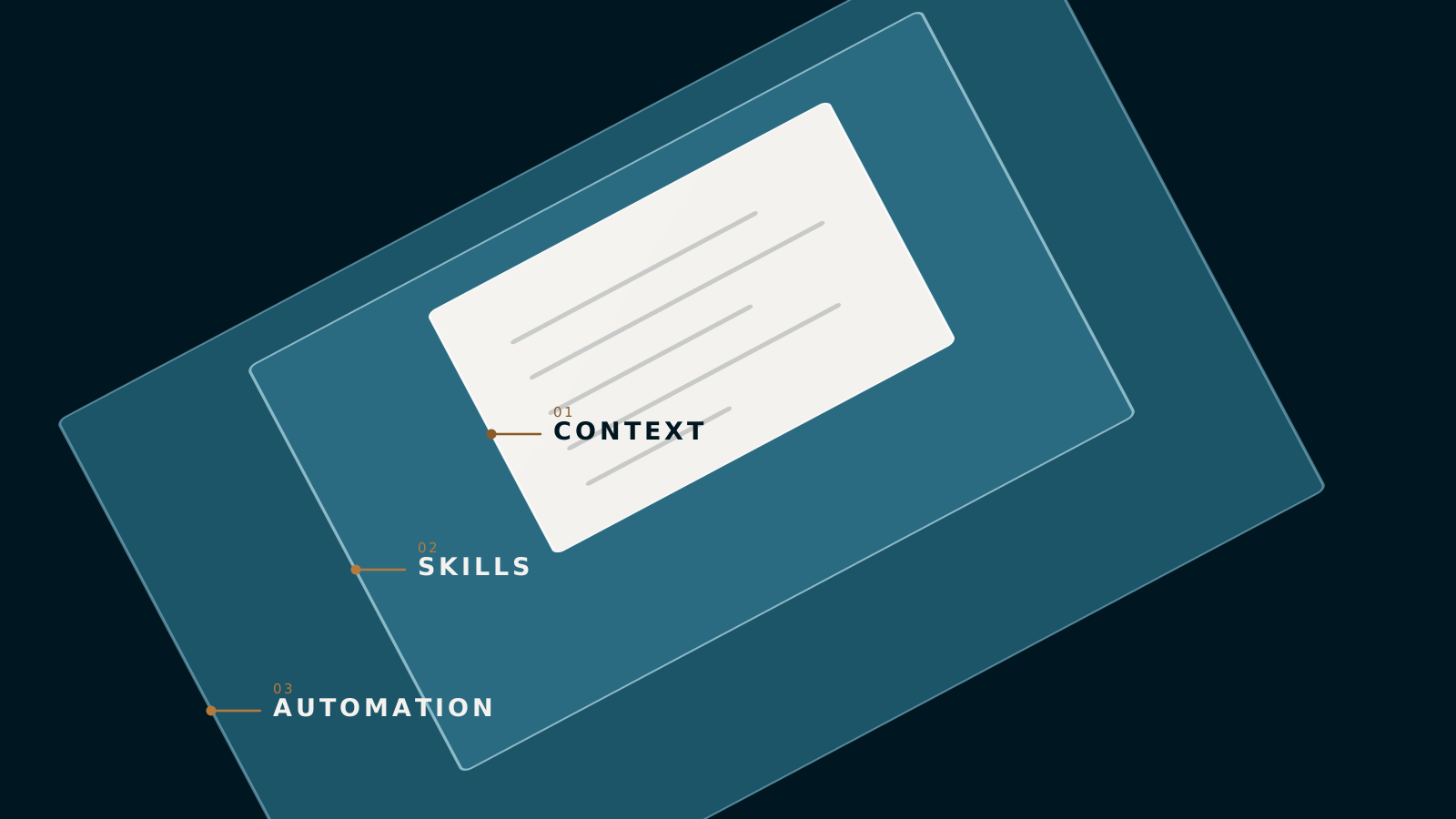
The richer labelled isometric SVG (01/02/03 CONTEXT/SKILLS/AUTOMATION baked in - a genuine layer hierarchy, so numbering is legitimate here) paired with a descriptive legend. Markers key to the three layer tones.

Three stacked plain-text planes: automation, skills, context, labelled 03/02/01, with an ochre riser stepping up through all three.
  • 1 Context

    Who you are, what you sell, how you write.

  • 2 Skills

    Playbooks it runs on command.

  • 3 Automation

    Playbooks that run once they have earned it.
Proof shot (real folder)

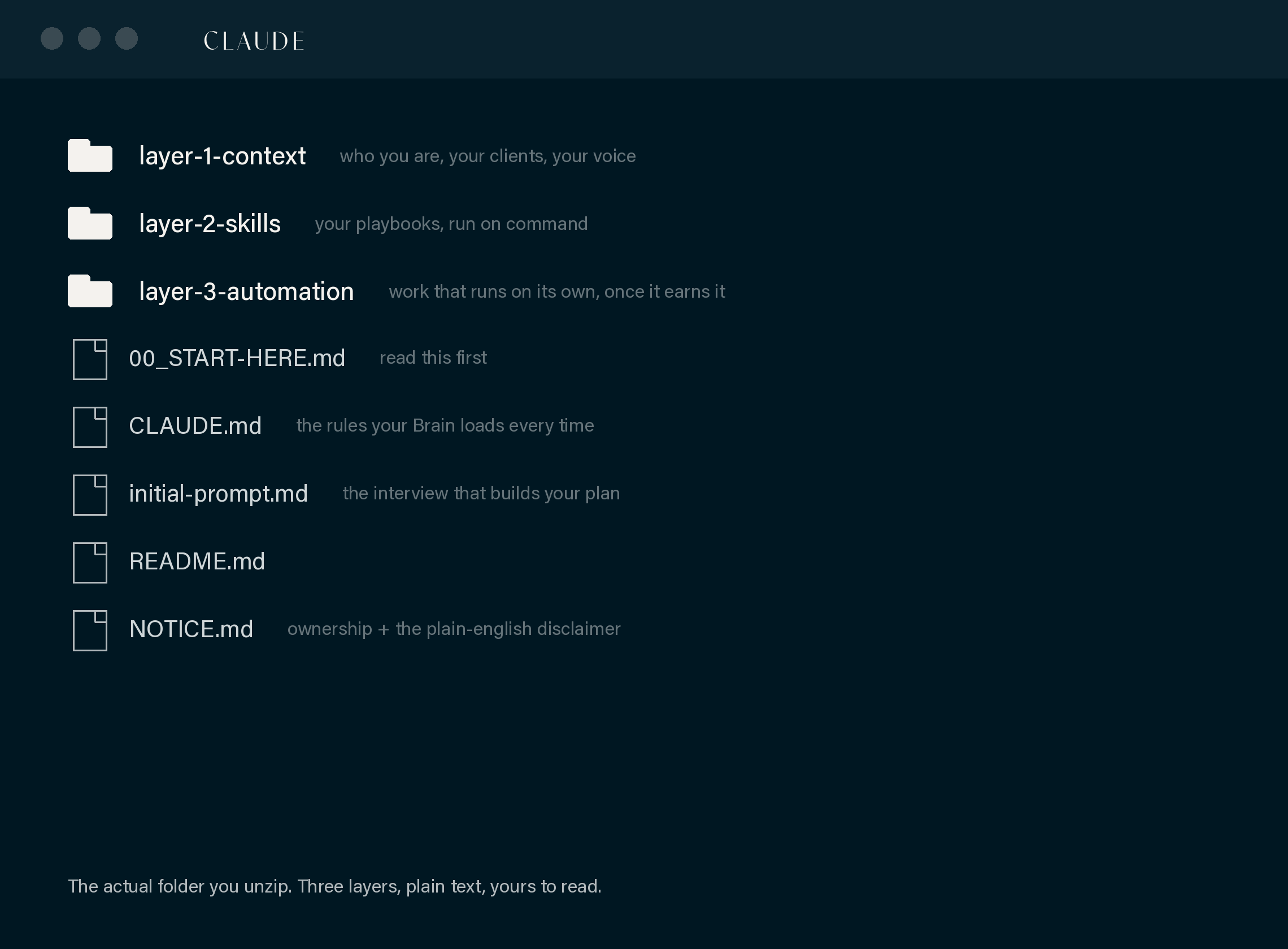
Marine band with the real unzipped-folder screenshot. Honest "this is the actual thing", structure only.

The actual thing

This is what you unzip.

The unzipped Claude folder with the three layer folders and plain files.

The real base folder. Structure only, no client data.

How it works (motif + 3 beats)

Full-width de-glowed motif over three beats. Beats use the ochre top rule (first is heavier), NOT 01/02/03 index numbers - the action headline and mono command carry each beat.

A three-beat flow: folder, command mark, settling cards.
  1. Download the folder

    Unzip it, open it in Claude Code.

  2. Type /brain-onboard

    One command hands over.

  3. It takes shape

    You talk, it types.

Keith block (person who built it)

Product-first, Keith as proof. Marked 4:5 placeholder photo slot until a real headshot is supplied.

Building this changed how we work, and I think it can do the same for you. Sharing the base costs me nothing and might save you the weeks it took us to figure out.

Keith Cluse, Founder of Cluse & Co, Adelaide

FAQ accordion

Native details/summary, ochre plus/minus marker, one open at a glance.

Does this cost anything?
The pack is free. You need your own Claude subscription. Claude Pro (or higher) is required.
Do I need to be technical?
No. The guide assumes a blank computer and checks your progress at every step.

Capture form

The conversion surface. Labels above inputs, ochre top rule, full-width primary button. Name + email + company honeypot.

Get the pack

One email, everything in it.

Your email is used to send you this pack, that is it.

Capture form, success state

After a successful send: the "check your inbox" copy PLUS the primary "Read the guide now" button, set to the guide URL the API returns (the read-now path). Focus moves to the heading for keyboard and screen-reader users.

Check your inbox.

An email from Nigella at Cluse & Co is on its way with the guide and the download.

Read the guide now

CTA band

Marine full-width closer, single repeated intent, ochre top rule.

Ready when you are.

The pack is free, the guide holds your hand, and your first session does the heavy lifting.

Send me the pack

Sticky mobile CTA

Mobile only (≤860px). A slim persistent bottom bar giving a one-tap path back to the form through the long warm-up middle, so a reader who warms up mid-page never has to scroll to the bottom. JS hides it whenever a capture form is on screen. Shown here as a static preview.

Free pack, one email Send me the pack

Guide step + copy block

Sequential step card (setup is genuinely ordered, so the number is legitimate) with a "you'll know it worked when" check, plus the copy-to-clipboard command block and the OS/path switch. Round 4: the step number is a QUIET inline mono marker on the h3 line, not a large numeral floated top-right, so the guide never reintroduces the enumerated-card feel the landing kills. The OS/path tab groups carry a role="group" + aria-label so a screen reader announces which switch it is.

06

Type /brain-onboard

That's the hand-off. From here your Brain takes over. It interviews you, researches as you go, and writes your plan.

/brain-onboard

You'll know it worked when your Brain introduces itself and asks its first question.